How to Search for Employees on LinkedIn Like a Pro

By Mriganka Bhuyan
•Founder at Munch
Let's be honest, searching for your next star employee on LinkedIn can feel like you're endlessly swiping through a digital Rolodex. The secret isn't just knowing what to search for, but how to search. It’s about combining smart keywords with surgical filtering to go from a sea of profiles to a shortlist of perfect fits.
This guide is your new playbook. We're going to walk through everything from basic searches to the pro-level stuff, like Boolean strings and Sales Navigator tricks, turning you into a LinkedIn talent-hunting expert.
Your Guide to Finding Top Talent on LinkedIn
Welcome to the modern hiring landscape. LinkedIn isn't just for awkwardly congratulating old colleagues on their work anniversaries; it's the single best place to find your next A-player. But here's the catch: just typing "Marketing Manager" into the search bar is like bringing a spork to a five-course meal. You need better tools.
And the numbers don't lie. A massive 95% of recruiters are already using LinkedIn to find people. It's not a niche trick anymore; it's the standard. Every single minute, seven people get hired through the platform. That adds up to over three million hires a year.
LinkedIn Search Methods at a Glance
To really get good at this, you need to understand the different ways you can search on LinkedIn. Think of it like leveling up in a video game: you start with the basic moves and gradually unlock the powerful combos. Your strategy will change depending on how specific the role is and what LinkedIn plan you have.
Here’s a quick rundown of the main approaches:
| Method | Best For | Example Use Case |
|---|---|---|
| Basic Search Bar | Quick, high-level searches for common roles or when you have a specific name in mind. | Finding a "Graphic Designer" in your city without needing deep qualifications. |
| Boolean Search | Refining results by combining keywords with operators like AND, OR, and NOT. | Searching for a "Software Engineer" AND "Python" NOT "Intern". |
| Sales Navigator | Highly targeted searches using advanced filters like company size, seniority, and recent job changes. | Pinpointing VPs of Sales at SaaS companies with 50-200 employees who have been in their role for less than a year. |
| Company Pages | Finding current or past employees of a specific company to source talent or conduct research. | Identifying all the product managers currently working at a direct competitor. |
Each method builds on the last, giving you more and more control over who you find. This isn't just about throwing keywords at the wall and seeing what sticks; it's a structured process.
This flow chart gives you a visual on how you can progress from a simple query to a highly-tuned, multi-layered search.
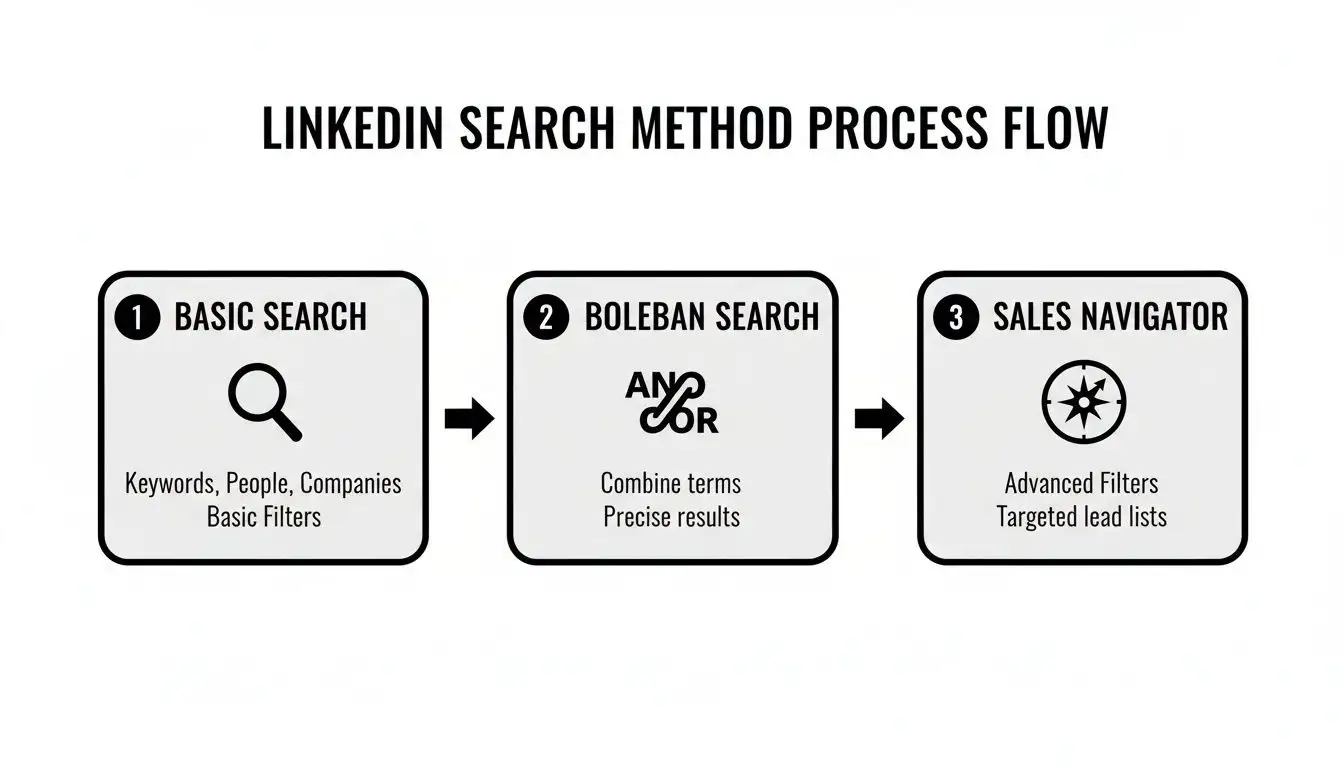
The real takeaway here is that you can layer these methods to get incredibly precise results.
The goal isn't just to find a candidate; it's to find the right candidate without wasting hours sifting through irrelevant profiles. Mastering these techniques connects you with people who are actually a great fit, not just someone who happens to have the right keywords on their profile.
Think of your sourcing strategy like a funnel. You start broad to see what's out there, then you get progressively more specific with your filters to zero in on the best people. This same structured approach is a cornerstone of many other growth activities; in fact, you can see similar ideas in these sales prospecting best practices.
Ready to dive in? Let's break down each stage.
Mastering the LinkedIn Search Bar Beyond the Basics

Most people treat the LinkedIn search bar like it’s a basic search engine from 2005. They just type in "Marketing Manager" and hope for the best. It’s time to level up. That simple little box is hiding a secret language, and learning it can completely change your recruiting game. I'm talking about Boolean operators.
Think of Boolean search as your cheat code for finding the exact people you need on LinkedIn. Instead of just throwing keywords at the wall and seeing what sticks, you're giving LinkedIn specific, non-negotiable instructions. You get laser-focused results, fast.
Your Boolean Operator Toolkit
These operators are the secret sauce. Once you get the hang of them, you’ll wonder how you ever managed to find anyone without them.
-
Quotation Marks " "
Use quotes to lock in an exact phrase. Searching for "Senior Content Manager" will only pull up people with that exact title. It filters out the noise, like "Content Managers" or "Senior Managers" from completely different departments. -
AND
This is your combo-builder. It narrows your search by making sure all your terms are included. For example, "Product Manager" AND "SaaS" finds people who have both keywords somewhere in their profile. It’s like telling your DJ, "Play Lizzo AND Beyoncé." You want both, or it's not a party. -
OR
The ultimate way to broaden your search when titles are flexible. A search for "UI Designer" OR "UX Designer" will show you profiles that contain either of those roles. Perfect for when you're casting a slightly wider net. -
NOT
This is your bouncer. It keeps the wrong people out of your search results. If you need experienced developers but keep getting swamped with entry-level folks, you could search "Software Developer" NOT "Intern" NOT "Junior". -
Parentheses ( )
Remember the order of operations from high school math? This is the same idea, but way more useful. Parentheses let you group terms together to build more complex, multi-layered queries.
The example ("Vice President" OR VP OR "S.V.P." OR SVP) AND (sales OR marketing) tells LinkedIn to find anyone with a senior leadership title in either the sales or marketing departments. Simple, but incredibly powerful.
Putting It All Together
Let's cook up a real-world search string. Say you need a senior software engineer who’s skilled in specific coding languages, but you want to avoid people who have already moved into management.
Your search might look something like this:
"Senior Software Engineer" AND (Java OR Python) NOT Manager
This basically tells LinkedIn, "Show me a highly skilled Jedi, but make sure they haven't been tempted by the dark side of management." It's this level of precision that separates casual browsing from strategic recruiting.
This isn't just a neat trick; it gets results. Recruiters who use skills-based searches on LinkedIn are actually 12% more likely to hire the right person. It makes sense, especially when you consider that 44% of users earn over $75,000 annually, meaning you’re definitely fishing in a well-stocked pond. You can dig into more of LinkedIn's user base and hiring trends if you're curious.
By combining these operators, you transform the search bar from a blunt instrument into a surgical tool. You'll spend way less time scrolling through irrelevant profiles and more time connecting with qualified candidates who actually fit your needs.
Unlocking Hidden Talent with Sales Navigator
If a standard LinkedIn search is like a trusty old flashlight, LinkedIn Sales Navigator is like strapping on a pair of military-grade night vision goggles. It’s the platform’s premium tool, and while it’s built for salespeople, its ridiculously powerful filters are a recruiter’s best-kept secret. This thing turns your search for employees from a guessing game into a high-stakes intelligence mission.

I know, I know: the monthly fee can make you pause. But think about the sheer amount of time you’ll save. Instead of slogging through thousands of profiles, you can zero in on your perfect candidates with almost scary accuracy.
Pro Tip: You can use Munch to build a list of people based on search filters including more technical fields like their Github profiles, their entire education and professional history or whether they recently changed jobs without breaking the bank!
Forget finding a needle in a haystack. This is more like having a super-magnet that yanks the needle right out for you.
Why Sales Navigator Is a Recruiting Game-Changer
The real magic of Sales Navigator is in the filters that are completely off-limits to regular LinkedIn users. These aren't just minor tweaks; they let you target people based on their recent behavior and deep company data, signals that scream, "Hey, I might be ready for a new job!"
It’s like being Neo in The Matrix, suddenly seeing the code behind every profile.
Here are just a few of my favorite filters for finding top talent:
-
Years in Current Role: Pinpoint folks who’ve been in their current gig for 3+ years. That’s often when the career itch starts to kick in and they get curious about what else is out there.
-
Company Headcount Growth: This is gold. Target candidates at rapidly growing companies because they’ve already navigated the chaos of scaling up.
-
Posted Content Keywords: Find true subject matter experts by searching for people who have recently posted content containing terms like "generative AI" or "product-led growth."
-
Seniority Level: Stop guessing based on fuzzy job titles. You can filter directly for "VP," "Director," or "Senior" level people right from the get-go.
Sales Navigator offers a whole dashboard of these specific filters, allowing you to build incredibly granular lead lists. Below is a breakdown of the filters I find myself using again and again when I'm on the hunt for talent.
Key Sales Navigator Filters for Recruiters
| Filter Name | What It Does | Recruiting Application |
|---|---|---|
| Spotlights | Highlights people who've changed jobs recently, been mentioned in the news, or posted on LinkedIn in the past 30 days. | Find actively engaged candidates or those who might be unsettled in a new role. The "posted in 30 days" filter is perfect for finding active thought leaders. |
| Years in Current Company/Role | Lets you filter for candidates based on their tenure in their current position or at their current company. | Target professionals who are likely ready for a new challenge (e.g., 3-5 years in a role) or those with proven loyalty (e.g., 5+ years at a company). |
| Company Headcount Growth | Filters for candidates working at companies with a specific growth rate (e.g., 20%+ year-over-year). | Source talent with experience in high-growth environments, which is invaluable for startups and scaling companies. |
| Posted Content Keywords | Searches for specific keywords within the content a person has shared or written on LinkedIn. | Identify true subject matter experts and passionate professionals, not just people who have a keyword in their profile. |
| Seniority Level | Narrows your search to specific levels of authority, such as Owner, Partner, CXO, VP, Director, Manager, or Senior. | Skip the noise and go straight to the decision-makers or senior individual contributors you need to hire. |
Using these filters in combination is where you really start to see the ROI. You can layer them on top of each other to create a persona-based search that’s almost guaranteed to surface high-quality candidates.
A Real-World Recruiting Scenario
Let's make this real. Say you need to hire a Marketing Director for a SaaS startup that's starting to take off. You don't just want anyone; you need someone who gets the startup grind and knows their stuff.
With a basic LinkedIn search, you’d probably just type in "Marketing Director" and hope for the best.
With Sales Navigator, you can build a search that looks more like a targeted missile strike:
Find me a "Marketing Director" at a "SaaS company" with "11-50 employees" located in "Austin, Texas" who has "posted about SEO in the last 30 days."
See the difference? You’re no longer just finding people with a title. You’re finding leaders with relevant industry experience, at a company of a similar size, in your exact location, who are actively proving their expertise online.
This ability to layer data points is a massive strategic advantage. The best AI sales tools operate on similar logic, combining multiple signals to identify high-intent prospects.
By thinking this way, you shift from just passively searching to actively conducting talent intelligence. You can spot the perfect hire on paper before you even send a single InMail, giving you a huge leg up in the brutal war for talent.
Sourcing Directly from Company Pages
Why search the entire ocean when you can fish in a well-stocked pond? Instead of casting a wide net with broad searches, one of the slickest moves is to go straight to the source: specific company pages. It's like having a backstage pass to your competitor's talent roster.
This approach is surgically precise. You just navigate to a target company's page, click on their "People" tab, and voilà, a searchable list of their current and past employees pops up. It’s the closest you’ll get to an official org chart without resorting to corporate espionage.
Pinpointing Your Ideal Candidates
Once you're on the "People" page, you can use its built-in filters to slice and dice the employee list. Think of it as a mini-search engine just for that company.
Let's say your SaaS company needs a seasoned Product Manager who already gets the fast-paced environment. You could head directly to the page of a top competitor, like Asana or Miro, and filter their employee list for the job title "Product Manager." Just like that, you have a high-quality list of candidates with directly relevant industry experience.
This method gives you a massive advantage because you know these individuals already understand your market, your customers, and probably even some of your challenges. This kind of targeted sourcing pays off. In fact, employees sourced via LinkedIn are 40% less likely to leave within the first six months, proving that finding the right fit from the start is a game-changer. You can dig into more data on LinkedIn's role in employee retention.
From Sourcing to Strategic Talent Mapping
This technique is about more than just filling an immediate opening; it's perfect for talent mapping. Talent mapping is the art of identifying the key players and rising stars within target companies to build a pipeline for future roles. You're not just hiring for today, you're building your dream team for tomorrow.
By consistently monitoring key competitors, you can spot top performers before they even hit the job market. You become the puppet master of your talent pool, ready to pull the right strings when the perfect role opens up.
Think of it this way:
-
Identify 5-10 "dream" companies where your ideal candidates likely work.
-
Regularly review their employee lists for key roles like "Senior Engineer," "Account Executive," or "Marketing Lead."
-
Track rising stars by noting who gets promoted or moves into leadership positions.
This proactive approach turns recruiting from a reactive scramble into a strategic function. Once you've identified these high-value individuals, the next step is often finding their direct contact details. If you're looking to take the conversation off-platform, check out our guide on how to find a business phone number to make that initial connection.
Turning Profiles into Real Conversations

Alright, you've found the perfect profile. It feels like hitting the jackpot, doesn't it? But hold on, the real work is just getting started. Now you’ve got to actually get their attention without sounding like every other spammy bot sliding into their DMs.
This is where the art of outreach separates the pros from the pests.
That generic, "I came across your profile and was impressed," message? It’s the recruiting equivalent of a dial-up modem. It's slow, outdated, and nobody wants to hear that screeching noise anymore. To stand out, you need to prove you’ve done more than a 10-second glance at their headline. Personalization is your superpower here.
Crafting Messages That Actually Get Replies
Think of your first message like the opening scene of a great movie: it has to hook them instantly. Ditch the bland templates and reference something specific and recent.
Did they just drop a killer article about AI in marketing? Mention a specific point that made you think. Maybe they just hit a work anniversary. A simple "congrats" shows you're a real person who's actually paying attention.
For example, a message like this works wonders:
"Hey [Name], I saw your recent post on scaling customer success teams and loved your take on proactive onboarding. That point about front-loading value in the first 30 days really resonated. We're building something similar here at [Your Company], and I thought you might be interested in a conversation."
See the difference? This isn't just flattery; it’s a genuine conversation starter built on their own expertise. It builds instant rapport and makes them far more likely to hit reply.
Enriching Profiles for Smarter Outreach
Sometimes, a LinkedIn profile only gives you half the picture. To really level up your outreach, you need more data. This is where profile enrichment comes into play, using third-party tools to dig up direct contact info.
This isn’t about being creepy; it’s about being effective. Snagging a direct work email or phone number lets you connect on another channel, cutting straight through the LinkedIn InMail clutter. If you're wondering how to do that, our guide on how to find business emails is a fantastic starting point for building out those contact lists.
This multi-channel approach is quickly becoming the new standard. Projections for 2025 show that AI-integrated searches boost quality hires by 9%, and that's partly because AI-assisted messaging saves recruiters roughly 20% of their workweek. It’s all about working smarter, not harder.
Using Automation Without Sounding Like a Robot
Let's get one thing straight: automation is not a substitute for personalization. It’s a tool to handle the boring, repetitive stuff so you have more time for the actual human touch. Lightweight automation can be a lifesaver for managing follow-ups and tracking who’s replied, ensuring great candidates don’t slip through the cracks.
Think of it like this:
-
Automate the reminders: Set up a simple sequence to send a polite nudge if you don't hear back after a few days.
-
Personalize the content: Use all that time you just saved to write that killer first message that mentions their recent project or a shared connection.
This balance lets you manage a bigger pipeline without your outreach quality taking a nosedive. You get to spend less time on copy-paste duty and more time having the meaningful conversations that land your next great hire.
Your Top LinkedIn Sourcing Questions, Answered
Alright, so you've got the strategies down, but a few nagging questions always seem to pop up when you're deep in a search. Let's tackle those common head-scratchers that can slow down even the most experienced talent pros. Think of this as your personal sourcing FAQ.
First, let's get one thing straight: LinkedIn is the place to be. With 72% of recruiters parked on the platform and 67% swearing the hires they find there are better quality, you know it works. If you want to dive deeper into the stats, you can see just how central LinkedIn has become to recruiting. The real trick isn't just being there; it's mastering the game.
Is LinkedIn Recruiter Really Worth the Hefty Price Tag?
Ah, the million-dollar question. Or, well, the few-thousand-dollar question. Is LinkedIn Recruiter worth the cost? The honest answer: it depends.
For companies that are constantly hiring or hunting for those "purple squirrel" candidates in super niche fields, Recruiter can absolutely be a game-changer. The souped-up filters, generous InMail credits, and built-in candidate management tools are designed for people who live and breathe sourcing.
But for a small business hiring a few times a year? It's like buying a bazooka to swat a fly. Honestly, you can get a massive amount of firepower by just mastering the Boolean and Sales Navigator tricks we've already covered, all for a fraction of the price. And if you're not excited about the manual hours required, you can simply use Munch to build your list of ideal candidates based on whatever filters you can dream of!
My take: If recruiting is a core, daily part of your job, Recruiter is an incredibly powerful ally. If you're only hiring occasionally, try Munch or stick with a free or Sales Nav account and sharpen your search skills.
How Do I Find People Actually Open to a New Job?
The bright green "#OpenToWork" banner is a dead giveaway, but let's be real, the best candidates often aren't waving a giant flag. They're usually passive, and you have to learn to read the subtle signs. It’s less about waiting for a flare gun and more about spotting the smoke signals.
Keep an eye out for these little clues:
-
A sudden surge in new connections: Are they suddenly adding a ton of recruiters or people at competing companies? Classic move.
-
A freshly polished profile: If their "About" section suddenly reads like a masterpiece or they've added a bunch of new skills, they're likely sprucing up the place for visitors.
-
They're suddenly very active: Someone who barely posted before is now liking, commenting, and sharing industry articles every day? They're probably trying to get on people's radar for a reason.
What's the Smartest Way to Find Remote Employees?
Sourcing remote talent is more than just clicking a button. You have to think in layers. Your first move is obvious: use the "On-site/Remote" filter and select "Remote." Easy peasy.
But don't you dare stop there. So many professionals don't bother to update that specific field but will mention remote work all over their profile. To catch them, you need to bring back our old friend, the Boolean string.
Tack this onto your keyword search. It’s simple but incredibly effective:
("remote" OR "work from home" OR "distributed team")
This little string will pull in anyone who mentions remote work in their job history, summary, or skills. It’s the perfect way to make sure you don’t miss out on a great candidate who just forgot to tick a box.
Finding and actually connecting with people who are ready to make a move can feel like a full-time job in itself. Munch is built to handle the entire workflow, from spotting prospects showing real intent and digging up their verified contact info, to helping you launch personalized outreach that actually gets a reply. See how Munch can build your pipeline for you.