Discover the sales automation process to cut busywork and close more deals

By Mriganka Bhuyan
•Founder at Munch
Let's be honest, the term "sales automation" sounds a little... impersonal. Maybe even a bit like you're plotting to replace your top closers with a team of robots. But that’s not it at all.
Think of it this way: a sales automation process is about taking the robotic parts of the job off your team's shoulders so they can be more human. It's less about building Terminators and more about building Iron Man suits for your sales reps.
What Is A Sales Automation Process

Let’s get one thing straight: building a sales automation process isn't about firing your sales team and letting Skynet take over. It’s about giving them superpowers. It’s less about replacement and more about equipping your reps with an Iron Man suit to handle all the tedious tasks that secretly drain their time and energy.
Instead of your team getting bogged down in hours of manual data entry, hunting for contact information, or setting endless calendar reminders, a smart process lets technology do the heavy lifting. This frees them up to do what they do best: connect with people, understand their problems, and actually build relationships.
The Real Goal of Automation
At its core, the idea is to build a predictable, efficient system that’s always on. It’s like having a tireless assistant who never needs a coffee break and ensures no lead ever falls through the cracks. It makes sure every prospect gets the right follow up at the right time, without a salesperson needing a spreadsheet with a hundred tabs to keep track of it all.
This kind of structure turns the sometimes chaotic art of selling into more of a data backed science. A solid sales automation process helps your team:
-
Slash manual tasks: Kills the time spent on admin work that can eat up a huge chunk of a rep's day.
-
Sharpen lead management: Automatically scores, assigns, and nurtures leads, which means much faster response times.
-
Amplify efficiency: Lets reps juggle more prospects at once without dropping the ball on quality conversations.
-
Lock in consistency: Guarantees every single lead gets the same proven follow up experience you’ve perfected.
The point of automation is to eliminate the busywork from a salesperson’s day so they can spend more time doing their actual job: selling. It’s about empowering them, not replacing them.
When it all comes together, a sales automation process becomes a scalable engine for growth. It shifts your team from guesswork and frantic to do lists to a system where every action is intentional, measurable, and aimed squarely at closing deals. It’s the difference between trying to navigate a new city with a crumpled paper map and using a GPS with live traffic updates.
The Five Pillars Of Modern Sales Automation
A killer sales automation process isn't just one piece of software; it's a finely tuned machine built from five core components. Think of them as the Infinity Stones of sales efficiency. Each pillar gives your team a unique power, and when you bring them all together, you create something genuinely unstoppable.
Let's break down how these pillars work together to build a sales machine that practically runs itself.
Lead Discovery And Capture
Everything starts with finding the right people to talk to. The first pillar, Lead Discovery & Capture, is all about automatically identifying and pulling in potential customers from across the internet. This isn't your grandpa's cold calling from a phonebook strategy. This is smart, automated prospecting.
Modern systems are set up to scan the web for buying signals. These are things like key job changes on LinkedIn, companies landing a fresh round of funding, or businesses that just adopted a technology that plays nicely with your product. Instead of reps spending half their day manually digging for gold, automation serves up high intent leads on a silver platter.
Imagine a tool that monitors tech news and automatically creates a new lead in your CRM every time a company in your target industry gets its Series B funding. That's a constant, hands free flow of fresh, relevant prospects. To dig deeper, check out our guide to supercharging your outbound lead generation efforts.
Lead Enrichment
Once you've got a name and an email, the next pillar works its magic. Lead Enrichment is like that scene in a spy movie where the hero gets a grainy photo, and the tech whiz instantly pulls up a complete dossier. This pillar automatically turns a basic contact into a rich, detailed profile.
The system takes a simple data point, like an email address, and scours public databases to add crucial context. This includes info like:
-
Company Data: The prospect's industry, company size, and annual revenue.
-
Contact Details: Verified phone numbers and social media profiles.
-
Technographics: The software and tools their company currently uses.
This saves reps from the soul crushing task of manually researching every single lead. With enriched data, they can walk into a conversation already knowing who they're talking to and what makes their business tick.
Pro Tip: Munch can help you build your lead list and enrich them with over 50+ providers!
Sequence Orchestration
With a list of enriched leads ready to go, it's time to start the conversation. Sequence Orchestration is the art of building automated yet personal communication flows that guide prospects through the first steps of the sales journey. It’s the engine that drives all your outreach.
This isn't about spamming people with generic junk. It’s about designing a thoughtful, multi step, multi channel cadence of emails and social media touchpoints. For example, a new lead might get a welcome email on day one, a LinkedIn connection request on day three, and a follow up email with a relevant case study on day five if they haven't replied.
A well orchestrated sequence ensures persistent but polite follow up without relying on a salesperson's memory. It guarantees no lead falls through the cracks and every prospect gets the right message at the right time.
Hyper Personalization At Scale
Okay, this is where things get really powerful. Hyper-Personalization at Scale uses all that data gathered during discovery and enrichment to make every automated message feel like it was handwritten just for that one person. This is what separates effective automation from stuff that ends up in the spam folder.
Using dynamic fields, the system can insert specific details into your templates. These include the prospect’s name, company, job title, or even a recent company achievement you found during enrichment. The goal is to move way beyond Hi {first_name} and create messages that genuinely show you’ve done your homework, even when the whole process is automated.
Measurement And Reporting
The final pillar ties everything together. Measurement & Reporting is about connecting your automated actions directly to real world outcomes and, most importantly, revenue. Without it, you're just flying blind. This pillar gives you the hard data to prove what’s working and what’s not.
Good automation platforms track key metrics like email open rates, reply rates, meetings booked, and ultimately, deals closed from specific sequences. This data creates a powerful feedback loop, letting you A/B test your messaging, tweak your timing, and constantly sharpen your sales process for better and better results.
By now, this systematic approach has become the standard. Industry trackers show that roughly three-quarters of organizations globally use some form of sales automation, with B2B companies leading the charge. The most common automated tasks are the ones that kill administrative busywork. Things like lead management, personalized outreach, and opportunity tracking free up reps to focus on what humans do best: building relationships.
To give you a clearer picture, here's how these five pillars fit together:
Core Components Of A Sales Automation Process
This table breaks down the five essential pillars of sales automation, their primary function, and a key tool example for each stage.
| Pillar | Primary Function | Example Action | Tool Category |
|---|---|---|---|
| Lead Discovery | Finds and captures potential customers based on specific signals. | Scans LinkedIn for new hires in target roles. | Prospecting Platforms |
| Lead Enrichment | Adds detailed contextual data to basic contact information. | Turns an email into a full profile with company and tech data. | Data Enrichment Tools |
| Sequence Orchestration | Automates multi step, multi channel outreach campaigns. | Sends a series of emails and social touches over two weeks. | Sales Engagement Platforms |
| Hyper-Personalization | Inserts unique, relevant details into automated messages. | Adds a custom P.S. about a recent company award. | AI Personalization Engines |
| Measurement & Reporting | Tracks performance and connects automation to revenue. | Generates a report showing which sequence booked the most meetings. | Analytics & BI Dashboards |
As you can see, each pillar handles a distinct job, but their combined power is what truly makes a modern sales process hum.
How To Build Your First Automation Workflow
Alright, theory is great, but let's get our hands dirty. It's time to move from the "what" to the "how" and actually build a high impact workflow that pretty much every business needs: the inbound lead follow up. This is the perfect place to start your sales automation journey.
Think of it like building with Legos. You start with the most important piece, the trigger, and then you snap everything else into place, one step at a time. For this workflow, our trigger is simple: a new lead fills out a form on your website. And just like that, the game is on.
This whole process rests on a few core pillars that work together in a continuous cycle, making sure nothing ever falls through the cracks.
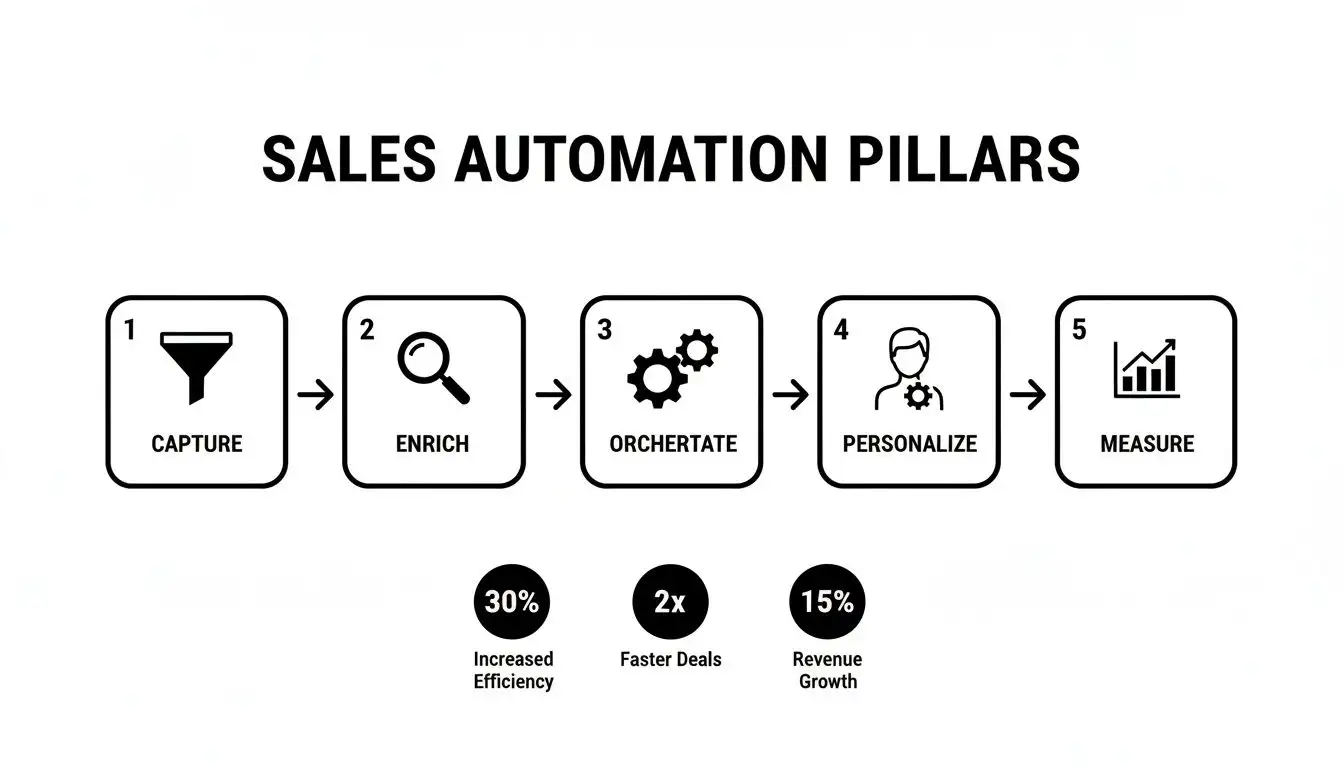
Each stage logically flows into the next, turning a simple contact form submission into a well oiled sales machine.
Step 1: Instant Lead Assignment
The second that form gets submitted, the clock starts ticking. Loudly. One study found that getting back to a lead within five minutes can boost conversion rates by a mind blowing 900%. Manually assigning leads is a total conversion killer. By the time a manager gets the notification, forwards it to a rep, and that rep opens their email, your prospect is already back on Twitter, completely forgetting they ever contacted you.
Automation makes this handoff happen in a flash.
-
Set up a rule: In your CRM, create a rule that automatically assigns any new lead to a sales rep.
-
Use smart routing: You can get clever with this. Assign leads based on territory (e.g., leads from Texas go to the southern rep), company size, or even use a simple round robin system to spread the workload fairly.
The result? It feels like you have a sales rep living inside your website, ready to pounce the moment a lead shows interest.
Step 2: Automated Data Enrichment
Before your rep even gets the notification, your automation engine is already working its magic. The system grabs the lead's email and starts beefing up their contact record with all sorts of crucial data. It’s like giving your sales team a cheat sheet for the conversation before it even starts.
This process automatically pulls in valuable context like the person’s job title, company size, industry, and maybe even what tech their company uses. Suddenly, your rep knows if they’re about to talk to a decision maker or an intern and can tailor their pitch on the fly.
An automated workflow turns a simple name and email into a rich, actionable profile. This eliminates manual research and equips your sales team with the intelligence they need to have a meaningful conversation from the very first touchpoint.
Step 3: Personalized Welcome Sequence
Okay, the lead is assigned and their profile is fleshed out. Now it's time to actually start the conversation. The lead is automatically enrolled into a personalized welcome email sequence. And no, this isn't just one generic "thanks for your interest!" email blast. It’s a carefully timed series of messages designed to engage, qualify, and build rapport.
A solid sequence might look something like this:
-
The Instant Value Drop (Sent Immediately): Confirms their submission and gives them something valuable right away, like a link to a killer case study or a relevant blog post.
-
The Problem Poking Email (Sent Day 2): Gently reminds them of the pain point your product solves. It shows you get it. You understand their world.
-
The Social Proof Nudge (Sent Day 4): Shares a quick customer quote or highlights a big name client to build some serious credibility.
The goal is to make every message feel personal, not like it came from a robot. If you need some inspiration for structuring these touchpoints, diving into some sales cadence best practices can give you a fantastic blueprint for timing and messaging.
Step 4: Triggering The Human Touch
Let’s be clear: automation is your assistant, not your replacement. The next critical step in our workflow is to listen for buying signals and create a task for a human to jump in. This is where the machine gracefully hands the baton to your sales rep.
For instance, you can set a rule that says: "If a lead opens an email three times OR clicks a link to the pricing page, then create a high priority task for the assigned rep to call them. Now."
This is how you ensure your team spends their time talking to the warmest, most engaged prospects. It's the perfect marriage of machine efficiency and human connection.
Step 5: Long-Term Nurturing
But what happens if the lead goes dark? They stop opening emails and basically ghost you. In a manual world, this is where they’d be forgotten, lost in the CRM abyss. In an automated world, their journey is just getting started.
If a lead goes through the whole welcome sequence without taking action, the workflow can automatically move them into a long term nurture campaign. This could be a monthly newsletter or a slow drip of helpful content sent every few weeks. It keeps your brand top of mind without being annoying, so when their needs finally change months down the line, you're the first call they make. This simple blueprint turns a fleeting inquiry into a lasting relationship, all running quietly in the background.
Real-World Examples Of Sales Automation
All this theory is great, but let's be honest, seeing a sales automation process actually work in the wild is where the lightbulb really goes on. It's time to move past the diagrams and see how three totally different businesses put automation to work, solving real problems and making more money.
These stories prove automation isn't some rigid, one size fits all script. It’s a flexible playbook you can adapt for whatever you’re selling, whether it’s software, sneakers, or high level strategy.
B2B SaaS Upsell Automation
Imagine a B2B SaaS company with a popular project management tool. Their big goal? Nudge customers from the mid tier "Pro" plan to the more profitable "Business" plan. Instead of forcing reps to stare at usage dashboards all day, they built a clever workflow to find the perfect moment to upsell.
The automation kicks in the second a user on the Pro plan chews through 90% of their file storage limit. This isn't just a random event; it's a massive buying signal that screams, "We're growing out of our current plan!"
Here’s how their automated play unfolds:
-
The Trigger: The system flags that the storage limit is nearly maxed out.
-
Action 1: Bam! A high priority task lands in the account manager’s CRM, complete with notes about the user's recent activity.
-
Action 2: At the same time, the user is dropped into a quick, two part email sequence. The first email is a high five, congratulating them on their team's awesome productivity and casually mentioning the unlimited storage on the Business plan.
-
Action 3: Two days later, a follow up email arrives with a case study from a similar company that saw a huge productivity jump after upgrading.
The results were almost immediate. This laser focused approach boosted their upsell conversions by 22% in the first quarter alone. Reps were no longer shooting in the dark; they were making their move when the customer needed them most.
Ecommerce Abandoned Cart Recovery
For an online shop selling custom kicks, an abandoned cart was like watching someone walk out of the store leaving a full shopping basket behind. It was a black hole of lost revenue. To fix it, they built a recovery sequence that felt less like a nagging reminder and more like a personal shopper.
The trigger is as simple as it gets: a customer adds gear to their cart, starts the checkout process, but then vanishes for an hour without buying.
An abandoned cart isn't a hard "no." It's just a "not right now." Automation turns that hesitation into a second chance, re engaging customers with timely nudges that get them over the finish line.
The automated actions roll out strategically over three days:
-
Email 1 (1 Hour Later): A friendly, "Did you forget something?" email pops into their inbox. It features big, beautiful images of the sneakers in their cart and a one click link straight back to checkout.
-
Email 2 (24 Hours Later): This one dials up the urgency just a notch, mentioning the items are hot sellers and might not be in stock forever. It also smartly includes a few five star reviews for the products they were considering.
-
Email 3 (72 Hours Later): Time for the knockout punch. The customer gets a final email with a one time 10% discount code to seal the deal.
This simple but brilliant sales automation process helped them recover an average of 18% of abandoned carts, turning thousands in would be losses into real revenue every single month.
Consulting Firm Appointment Scheduling
A boutique consulting firm was getting absolutely buried in admin. Their best consultants were wasting precious hours every week playing email tennis just to lock down a single discovery call. It was a colossal time suck pulling them away from the work that actually paid the bills.
So, they automated their entire scheduling front end. Now, the trigger fires the moment a potential client hits "submit" on the "Request a Consultation" form.
Here’s what happens next:
-
Instant Gratification: The prospect gets an immediate thank you email. Tucked inside is a direct link to the consultant's live calendar (using a tool like Calendly), letting them book a slot on the spot.
-
Smart Reminders: Once booked, the system sends calendar invites to everyone. It also sends a reminder email 24 hours out and a quick text message one hour before the call.
This straightforward workflow completely killed the scheduling chaos, slashed no shows by a whopping 30%, and handed back an estimated five hours per week to each consultant. It makes them look sharp, professional, and organized from the very first touchpoint. As you can see, even a basic cold email example for follow ups can be transformed with automation.
How To Choose The Right Automation Tools
Diving into the sales tech market can feel like trying to pick a movie on Netflix. You've got endless options, a dozen recommendations from friends, and you're just one bad choice away from wasting a perfectly good evening. The goal here isn't to snag the shiniest new toy on the shelf; it's to build a tech stack that genuinely helps your team sell, not just gives them more logins to remember.
Think of your Customer Relationship Management (CRM) platform as the central nervous system of your whole operation. It’s the mothership. The command center. Every single tool you add to your arsenal needs to plug into it seamlessly. If they don't talk to each other, you're just creating data islands, and that's the fast track to a digital nightmare. Get your foundation right before you even think about building the fancy add ons.
Building Your Core Tech Stack
Beyond your CRM, a few key pieces of software form the backbone of any solid automation strategy. You don’t need to buy them all at once, either. Just start with the essentials that will give you the biggest bang for your buck right away.
A great starting point usually includes:
-
An Email Sequencer: This is your outreach workhorse. It’s what runs all those multi step, multi channel campaigns that keep your follow up game strong without forcing your reps to live in a forest of sticky notes.
-
A Lead Enrichment Service: This is your secret weapon. It takes a basic email address and automatically fleshes it out with crucial details like job titles, company size, and what technology they’re using. It's like having a private investigator for every lead. And if you're wondering, yes - we use Munch to build our lead list and enrich our own leads :D
-
A Scheduling Tool: End the soul crushing "what time works for you?" email chain once and for all. This simple tool makes booking a meeting effortless, making you look way more professional and saving everyone a headache.
The demand for these tools is exploding. The global sales automation market is on track to hit around $16.0 billion by 2025. This is a massive leap from $7.8 billion back in 2019, all thanks to smarter AI and more teams getting on board. You can dig into more stats and get deeper insights on MarketsandMarkets.com to see just how fast this space is moving.
Questions To Ask Before You Buy
When you're sitting through product demos, try not to get dazzled by all the slick features. Your real focus should be on two things: integration and practicality. Does this new tool actually play nice with the systems you already rely on?
Choosing the right tool isn’t about finding the one with the most features. It's about finding the one that solves your biggest bottleneck without creating three new ones. Your process should dictate your technology, not the other way around.
Before you pull out the company card, ask some pointed questions. How does the platform handle email deliverability? A bad sender reputation can get your outreach campaigns shut down before they even get started. In fact, learning how to improve email deliverability is a crucial skill for your team, no matter which tool you pick. And don't forget to ask about customer support. When things inevitably go sideways, you'll want a real human to help you out, not a link to a generic FAQ page.
Start small, master the basics, and then you can start expanding your tech stack as your process evolves and your needs grow.
How to Measure and Optimize Your Process
So you've built your sales automation machine. Now what? Just letting it run without checking the gauges is like setting a new playlist on shuffle and walking away. You'll never know which songs are getting people on the dance floor and which ones are clearing the room.
"Set it and forget it" is a one way ticket to mediocrity. The real magic happens when you're constantly tinkering, tuning, and optimizing. It’s about focusing on the numbers that actually matter, not just the ones that look good on a report.
Key Metrics That Actually Matter
Forget vanity metrics like email opens. They don't tell you the whole story. To really get a feel for what’s working, you need to track the KPIs that connect directly to your bottom line.
Here’s what the pros keep an eye on:
-
Email Reply Rate: This is the gold standard. A reply means your message was compelling enough to start a real conversation. It’s a far better indicator of engagement than a simple open.
-
Lead Response Time: In sales, speed kills the competition. How fast does your automation kick in when a new lead pops up? Shaving minutes, or even seconds, off this time can have a huge impact.
-
Sales Cycle Length: Is your automation helping your team close deals faster? This metric shows you if your process is actually accelerating revenue.
-
Conversion Rate at Each Stage: Watch how many leads successfully move from one step to the next. This is how you find the leaks in your funnel and plug them for good.
The goal here is to create a constant feedback loop. The data you collect should immediately inform your next move, turning your sales engine into a machine that gets smarter and more effective with every single interaction.
Turning Data Into Action
Once you have the numbers, it’s time to start experimenting. This is where A/B testing becomes your secret weapon. Don't just guess what will work better, prove it. You can test just about every element of your sequences to see what moves the needle. To get even sharper on identifying your best prospects, you can learn what is lead scoring in our detailed guide.
Try testing different subject lines to see which ones get more replies. Swap out your call to action to see what drives more clicks. You can even play with the timing of your follow ups. These small, consistent tweaks are what add up to massive improvements over time.
And the data backs this up. Teams that nail their sales automation see productivity jump by an average of 14.5%. They also slash their sales cycles by up to 22%, all because they let the data guide their strategy. You can dig into more of these sales automation statistics and their impact to see the full picture.
This endless cycle of measuring, testing, and optimizing is what separates a decent sales automation setup from a truly unstoppable one.
Got Questions? We've Got Answers.
We've walked through the ins and outs of building a sales automation engine. But let's be honest, you've probably got a few nagging questions rattling around. It's time for a quick fire Q&A to tackle those common concerns head on.
Think of this as the final huddle before you go build something awesome.
Is This Automation Stuff Just For The Big Guys?
Nope. Not even close. While the Fortune 500s have the cash for gigantic, all encompassing systems, sales automation has never been more democratic. There are tons of tools built specifically for scrappy startups and growing businesses, with price tags that won’t give your finance team a heart attack.
Frankly, smaller teams often feel the benefits the fastest. When you only have a handful of reps, giving them back even an hour a day is a game changer. It lets a small team compete like they’re a division of giants.
Won't This Just Make My Sales Team Lazy?
That's the classic worry, but it’s looking at the problem completely backward. It’s like giving a world class carpenter a power saw instead of a handsaw. Does it make them lazy? Of course not. It makes them ridiculously efficient, precise, and free to focus on the actual craft.
Automation eats up the mind numbing grunt work. This frees your reps to do what they're actually paid for: building real relationships, thinking strategically about their accounts, and, you know, closing deals. Good automation doesn’t breed laziness; it breeds focus.
A great sales automation process doesn't replace skilled salespeople. It unleashes them. By handling the repetitive, soul crushing tasks, it lets your team focus their energy entirely on the human side of selling.
This whole approach is about empowering your team to spend less time drowning in data entry and more time actually talking to people. The payoff? A sharper, more motivated sales force that hits its numbers without the burnout.
Ready to swap the busywork for a bigger pipeline? Munch is your platform for finding leads who are ready to buy, getting the data you need, and kicking off personalized outreach that people actually respond to. Discover your next customer today!