A Ridiculously Practical Guide to Prospecting on LinkedIn

By Mriganka Bhuyan
•Founder at Munch
So, what exactly is LinkedIn prospecting? Forget blasting cold messages into the digital abyss. We're talking about the art of strategically finding, connecting with, and actually engaging potential customers on the platform. It's about building genuine relationships that naturally lead to sales, not just another numbers game.
The beauty of this approach is its precision. You can pinpoint the exact decision-makers you need to talk to and kick off conversations based on real, tangible information.
Your LinkedIn Profile Is a Landing Page, Not a Resume
Let's get one thing straight right now: if you're treating your LinkedIn profile like a digital CV from 2008, you're leaving a massive amount of money on the table. Nobody cares that you were "Employee of the Month" in Q3 2019. Seriously. What they do care about is what you can do for them.
Think of your profile as a high-stakes landing page. Every single element, from your headline to your 'About' section, needs to scream the answer to your prospect's silent, all-important question: "What's in it for me?" The goal is simple. When a potential client lands on your page, you want their first thought to be, “Okay, this person gets it,” not “Oh, great... another salesperson.”
This mental flip is the secret sauce. It transforms your profile from a static resume into a silent, 24/7 sales partner. It does the heavy lifting for you, convincing visitors that you understand their world and their problems before you’ve even sent a single message.
Profile Transformation From "Me" to "You"
Let's look at how to shift your profile's focus from being all about you to being all about your prospect. It's a subtle but powerful change.
| Profile Section | The Standard (And Boring) Approach | The Prospect-Centric Upgrade |
|---|---|---|
| Headline | "Sales Director at NextGen Solutions" | "Helping B2B Tech Founders Shorten Sales Cycles by 30%" |
| About Summary | "Results-driven sales professional with 10+ years of experience..." | "Most marketing leaders I speak with are struggling to generate qualified pipeline..." |
| Experience | "Responsible for managing a team of 5 and hitting quarterly targets." | "Led a project that helped our e-commerce clients increase AOV by 15%." |
| Featured Section | A link to your company's homepage. | A case study, a client testimonial video, or a valuable checklist. |
See the difference? One is a backward-looking summary of your career. The other is a forward-looking promise of value to your future clients.
Nail Your Headline: From Job Title to Problem-Solver
Your headline is the most valuable piece of real estate on your entire profile. Don't waste it. The default "Account Executive at TechCorp" is the modern-day equivalent of a dial-up modem. It technically works, but it’s painfully slow at getting the point across.
You need to reframe it as a value proposition that hits your ideal customer right between the eyes. Forget your job title; focus on the outcome you deliver.
Here are a couple of quick flips:
-
Boring: Sales Manager at Innovate Solutions
-
Magnetic: Helping Retail Brands Boost E-commerce Sales by 40%
-
Boring: Software Developer at Cloudify Inc.
-
Magnetic: I Build Scalable Cloud Infrastructures That Cut DevOps Costs
This tiny tweak immediately positions you as a problem-solver, not just another person with a job title.
Your profile should be a magnet for your ideal clients, not a catalog of your past jobs. The focus must shift entirely from your accomplishments to their needs.
Rewrite Your 'About' Section as a Conversation Starter
The 'About' section is where you really connect the dots. Stop listing skills like you're reading a grocery list. Instead, tell a story. A story that resonates with your ideal client’s biggest headaches.
Kick things off by calling out the main problem they're wrestling with. Then, walk them through how you guide people just like them to a better place, using their language, not corporate jargon. This section is a critical piece of your B2B marketing funnel on LinkedIn, warming up leads before you even think about reaching out.
It’s no secret that LinkedIn is becoming the go-to for sales. A whopping 68% of B2B marketers have ramped up their use of the platform in the last year alone. More than half are using it specifically to hunt for prospects and grab contact details. The writing is on the wall: a client-focused profile isn't just a "nice-to-have" anymore, it's absolutely essential.
Finding Your Ideal Prospects Without Getting Lost
LinkedIn is a professional goldmine, boasting over a billion users. But prospecting on it without a clear strategy is like trying to find a specific needle in a continent-sized haystack. It's a recipe for burnout. To succeed, you need a system to slice through the noise and zero in on the exact people who will actually benefit from what you're selling.
This is where you graduate from using basic filters to deploying some serious targeting tactics.
It's time to move beyond surface-level searches and get comfortable with two of the most powerful tools in your prospecting arsenal: Boolean search and LinkedIn Sales Navigator. Think of them as your GPS and high-powered binoculars, helping you find the right people with almost scary accuracy.
Mastering the Art of Boolean Search
Boolean search is your secret weapon. It’s a simple way to give LinkedIn very specific, non-negotiable instructions on who to find. By using a few simple commands (we call them operators), you can combine or exclude keywords to turn a vague hunt into a precise, targeted strike.
Here are the core operators I use every single day:
-
Quotes (""): Essential for exact phrases. If you search for "VP of Sales", you won't get profiles for "Sales VP" or people who happen to have "VP" and "Sales" scattered randomly in their profile. It forces an exact match.
-
AND: This narrows your search down. A query like "Marketing Director" AND "SaaS" will only pull up Marketing Directors who are specifically in the SaaS industry. No fluff.
-
OR: This broadens your search. If you want to target the top dogs, searching for "Founder" OR "CEO" will show you profiles that contain either of those titles. Super useful for reaching decision-makers.
-
NOT: This is your filter. A search for "Sales Manager" NOT "Recruiting" helps weed out managers who are focused on hiring, not on the operational side you're targeting.
-
Parentheses (()): Remember math class? Same principle. Use parentheses to group complex searches and tell LinkedIn which operations to perform first.
Let's see it in action. Imagine you sell project management software to tech companies, but your solution isn't a great fit for massive enterprise corporations.
Your Boolean search could be:
("Project Manager" OR "Head of Operations") AND ("SaaS" OR "Technology") NOT ("Enterprise")
That one simple string instantly weeds out thousands of irrelevant leads and serves up a highly qualified prospect list. This kind of precision is the bedrock of smart outbound lead generation strategies that respect everyone's time, yours and your prospect's.
Finding the Perfect Moment with Trigger Events
Pinpointing the right person is only half the job. The other half is reaching out at the right time. Trigger events are the little signals that tell you a company or individual might suddenly be very open to new ideas. This is where Sales Navigator really shines.
Prospecting on LinkedIn isn't just about finding people; it's about finding opportunities. Trigger events are the flashing neon signs that tell you when a prospect is most likely to listen.
Keep your eyes peeled for these game-changing signals:
-
New Funding Rounds: A fresh pile of cash usually means there's a new budget and a mandate for aggressive growth.
-
Key Executive Hires: When a new VP of Sales comes on board, they're almost always looking to make their mark with new tools or a revamped process.
-
Company Mentions in the News: Big product launches or positive press can signal a period of expansion and a need for new solutions to support it.
-
Recent Job Changes: Someone who just started a new role is on a mission to prove their worth and make an impact. Fast.
When you combine sharp boolean searches with a keen eye for these trigger events, you’re no longer just another cold message. You’re a timely, helpful solution provider who shows up at the exact moment you're needed most.
Crafting Connection Requests That Actually Start Conversations
Hitting that "Connect" button and sending the default “I’d like to connect on LinkedIn” is a cardinal sin of prospecting. It's the digital equivalent of walking up to someone at a conference, staring at them blankly, and saying absolutely nothing. It’s awkward, lazy, and a massive missed opportunity.
Your connection request is your first impression. It’s your digital handshake. The goal isn't to pitch; it's to move from being just another random name in their inbox to a real person they might actually want to talk to.
Give Before You Even Think About Asking
So, what's the secret? It’s all about the "Give Before You Ask" principle. You lead with something of value: a genuine compliment, a shared interest, a piece of insight. You aren't asking for a 15-minute demo. You're offering a tiny bit of goodwill that makes hitting "Accept" a no-brainer.
Put yourself in their shoes for a second. Their inbox is a graveyard of generic connection requests. Yours has to be the one that makes them stop scrolling and think, "Huh. This person actually did their homework."
Instead of the generic default, try something that shows you've spent more than three seconds on their profile:
-
Compliment Their Content: "Hi Sarah, saw your post on AI in marketing and loved your take on personalization. That HBR article you shared was spot on. Would love to connect."
-
Reference a Shared Experience: "Hi David, noticed we were both in the 'Future of SaaS' webinar yesterday. I found the discussion on product-led growth fascinating. Hope to connect and share notes."
-
Acknowledge Their Work: "Hi Maria, my team and I have been following [Company Name]'s recent product launch. Super impressive stuff. Cheers to you and the team, and I'd be glad to connect."
The Art of Personalizing at Scale
Look, personalizing doesn't mean you need to write a custom biography for every single prospect. That’s a one-way ticket to burnout. The real trick is finding common ground you can reference quickly, without coming across like a stalker who just spent three hours deep-diving their profile.
It's about finding one, just one, relevant anchor point. Did they just get a promotion? Did their company hit a big milestone? Are you both in the same industry group? Latch onto that single detail and build your short message around it.
Moving from a generic template to a personalized note is about showing respect for the other person's time and intelligence. It’s the difference between junk mail and a handwritten letter.
This small shift in strategy pays off, big time. We've seen that LinkedIn direct messages pull in a 10.3% response rate, which absolutely crushes the 5.1% average for cold email. A huge part of that is because there are no spam filters on LinkedIn; your well-crafted message is guaranteed to land in their inbox.
If you're curious about how this stacks up against other channels, you can check out some effective cold email examples and strategies to see the difference. Mastering this simple shift is a cornerstone of winning at LinkedIn prospecting.
Mastering the Art of the Follow-Up
The real magic in LinkedIn prospecting happens after the connection request. Let's be honest, most people send one message, hear crickets, and then float away like that "This is fine" dog meme. This is precisely where you win, because the data is clear: around 80% of sales require at least five follow-ups.
Your goal isn't to become an inbox pest. It's about being politely persistent and adding a sprinkle of value at every turn. Think of it as a friendly conversation spaced out over a couple of weeks, not a rapid-fire interrogation.
This visual timeline breaks down a simple, effective outreach flow for your LinkedIn prospecting.
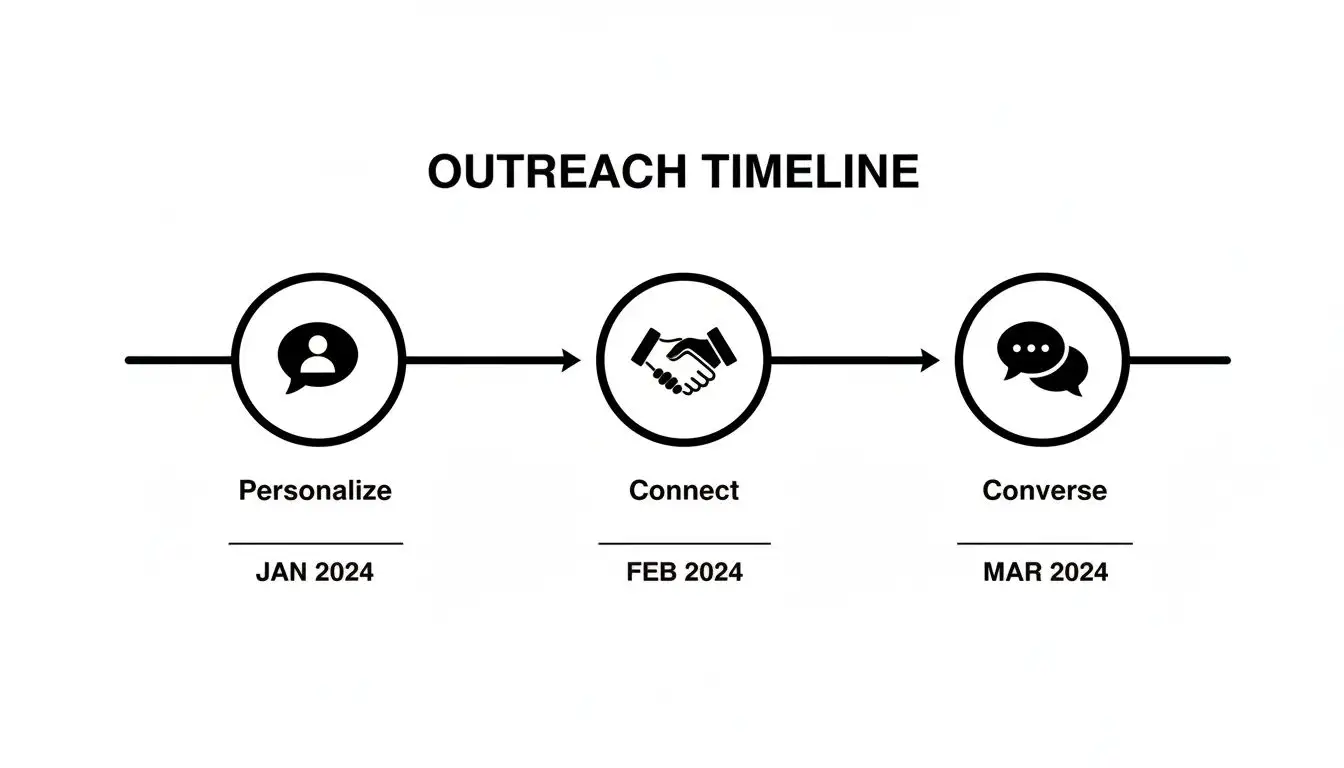
The big takeaway here is that great outreach is a process, not a single event. It’s a journey from personalization to connection and, finally, to a real conversation.
The Value-Driven Follow-Up Cadence
A killer follow-up sequence is less about what you want and more about what your prospect might find genuinely useful. It’s a series of light touches designed to build familiarity and trust over time. Just blasting the same "just checking in" message is the prospecting equivalent of a toddler asking "Are we there yet?" on a road trip. It helps absolutely no one.
Here’s a practical cadence you can swipe and deploy immediately:
-
Day 3 Post-Connection (The Soft Touch): Hold on, don't slide into their DMs just yet. Find a recent post they shared or commented on. Add a thoughtful comment or even just a simple "like." It’s a low-effort way to pop back up on their radar. For example, if they post an article on AI, your comment could be, "Great share! The point about data privacy is something more leaders need to consider."
-
Day 5 (The Conversational Bridge): Okay, now it's time for that first message. Reference your previous interaction to show you're not just spamming a list. You could say, "Hi [Name], really enjoyed your recent post on AI. It got me thinking about [insightful question related to the topic]. Curious to hear your take." This proves you're paying attention and are interested in their opinion, not just their budget.
-
Day 10 (The Value Play): Still haven’t heard back? Time to offer something genuinely useful. This is not the moment for your sales deck. Instead, find a third-party resource like an industry report, a helpful tool, or an insightful webinar. For instance, "Hi [Name], came across this industry report on AI adoption trends and thought you might find it interesting, especially page 7. No need to reply, just wanted to share."
The goal of a follow-up is not to close a deal; it's to earn the next conversation. Each step should offer a reason for the prospect to engage, even if it's just a simple acknowledgment.
This methodical approach respects your prospect's time while keeping you top of mind. For those looking to dive deeper into structuring these multi-touch sequences, exploring different sales cadence best practices can give you a more advanced framework. The key is turning a "no response" into a "let's talk" by being consistently valuable and strategically patient.
Tracking What Matters and Dodging the Landmines
Let's be honest. Prospecting on LinkedIn without tracking your numbers is like driving with your eyes closed. You're definitely moving, but you have no clue if you're headed for a five-star resort or straight into a ditch. It's time to stop winging it and start measuring what actually gets you paid.
Forget the fluff. Profile views and likes are vanity metrics. They feel nice, but they don't buy you lunch. The real MVPs are the numbers that draw a straight line from your daily grind to actual revenue.
The Numbers That Actually Count
If you're serious about turning LinkedIn into a lead-generating machine, you need to become obsessed with a handful of key metrics. These are the stats that tell the real story of whether your efforts are working or just wasting time.
-
Connection Acceptance Rate: This is your first checkpoint. It tells you if your targeting is on point and if your connection note is compelling enough to get a "yes." A high rate here means you're knocking on the right doors with a message that makes people curious.
-
Positive Reply Rate: This is the big one. It's not just about getting a reply; it's about getting a good one. This metric filters out the "no thanks" and "unsubscribe" responses, showing you how many accepted connections are turning into actual conversations. A high acceptance rate but a low reply rate is a massive red flag. It means your follow-up game needs a serious overhaul.
-
Meetings Booked: This is the bottom line. The ultimate goal. How many of those conversations are turning into real, calendar-worthy sales opportunities? This is the clearest measure of your ROI. To really dial this in, you can implement some lead scoring best practices to identify the most promising prospects.
Prospecting is a science, not a shot in the dark. If you aren't religiously tracking your acceptance, reply, and meeting rates, you're not optimizing, you're just hoping.
Steer Clear of These Classic Blunders
Knowing your numbers is only half the battle. The other half is avoiding the cringey, all-too-common mistakes that kill your campaign before it even has a chance to breathe. Please, for the love of all that is good, avoid these.
-
The Connection Request Pitch-Slap: This is the cardinal sin of LinkedIn. It’s the digital equivalent of asking someone to marry you before you’ve even introduced yourself. The goal of a connection request is to open a door, not shove your entire sales deck through it. Just stop.
-
The "War and Peace" First Message: Nobody is going to read your life story or a four-paragraph essay about your product features. Your initial messages should be short, punchy, and focused entirely on them and their potential problems. Get to the point, or get ignored.
-
Automating Like a Clueless Robot: Sending hundreds of identical, soulless messages is the fastest way to get your account restricted and your reputation torched. Good automation is your trusty sidekick; it handles the grunt work so you can focus on genuine human connection. Bad automation makes you look like a spammer from 2005.
At the end of the day, LinkedIn is the undisputed king of B2B prospecting. Don't just take my word for it; research shows it’s a staggering 277% more effective for lead generation than Facebook and X combined. The platform’s own Lead Gen Forms have an incredible 13% conversion rate, blowing most website landing pages out of the water. For a deeper dive, check out the full report on these powerful LinkedIn marketing statistics.
By focusing on the right data and sidestepping these rookie mistakes, you’ll be well on your way to truly unlocking its power.
Your Burning LinkedIn Prospecting Questions, Answered
Alright, you've made it through the playbook. You're probably feeling pumped and ready to dive in, but let's be real, a few nagging questions are probably bouncing around in your head. It’s like reaching the final level of a video game only to find a few tricky new obstacles you didn't see coming.
Let's clear the air. Here are the answers to the most common questions that pop up when you're getting serious about LinkedIn prospecting. No fluff, just straight talk.
How Many Connection Requests Should I Send Per Day?
Look, LinkedIn has its official weekly limits, usually hovering around 100 to 200, to stop the platform from turning into a spam-filled wasteland. But the real answer? Quality absolutely demolishes quantity. Every. Single. Time.
Sending 20 truly personalized requests a day will get you worlds further than shotgun-blasting 100 generic ones. A lower daily target forces you to actually do your homework and find a solid, human reason to connect. That’s what sparks real conversations, keeps your account in good standing, and frankly, respects everyone’s time.
Is LinkedIn Sales Navigator Really Worth The Price Tag?
If you're even a little bit serious about B2B sales, the answer is a resounding yes. It's a total game-changer. Trying to prospect with a free LinkedIn account is like trying to find a specific needle in a giant, chaotic haystack... while blindfolded. You might stumble upon something eventually, but it's going to be a painful, frustrating process.
The question isn't whether Sales Navigator is expensive; it's whether prospecting with one hand tied behind your back is costing you more in missed opportunities. For serious B2B teams, the answer is almost always yes.
What’s The Best Way To Handle A "Not Interested" Reply?
First things first: don't take it personally. It’s business, not a rejection of you as a human being. Second, be cool about it. A simple, professional reply goes a long, long way.
Try something like, "Thanks for letting me know, [Name]. I appreciate you getting back to me honestly. All the best." That’s it.
This approach does two brilliant things:
-
It leaves the door open for the future without any weirdness.
-
It positions you as a professional, not some pushy sales bot who can't handle hearing "no."
You’d be surprised how often that polite and respectful exit leaves a positive impression. People remember that stuff.
Should I Use Automation Tools For LinkedIn Prospecting?
This is a big one. Automation can be your best friend or your worst enemy, sort of like a T-1000 from Terminator 2. Used well, it's an unstoppable force for good. Used poorly, it creates a trail of destruction.
Automating things like profile views or endorsements can be a fairly low-risk way to show up on someone's radar. But automating connection requests and messages? That's playing with fire. It almost always results in cringey, generic outreach that turns people off and puts your account on LinkedIn's naughty list.
The sweet spot is a hybrid approach. Use tools for the grunt work like research and data gathering, but keep the communication, the actual human-to-human part, manual and personal. Never automate the relationship.
Ready to turn these insights into a high-powered sales engine? Munch is a sales intelligence platform that helps you find high-intent prospects, enrich their data with 95%+ accuracy, and launch personalized outreach that actually gets replies. Stop guessing and start prospecting with precision. Discover your next best customers with Munch.