Crafting the Perfect LinkedIn Connection Message

By Mriganka Bhuyan
•Founder at Munch

A killer LinkedIn connection message feels like you've done your homework. It’s personal, offers a peek at real value, and avoids the cringey hard sell. That tiny bit of effort is what separates a genuine conversation from getting ghosted instantly.
Why Your LinkedIn Connection Message Gets Ghosted
Let's be real for a second. That default "I'd like to add you to my professional network" message? It's the business world's equivalent of a dial-up tone in a 5G world. It’s lazy, impersonal, and screams, “I have no idea who you are, but I want something from you.”
This is precisely why busy professionals have developed a ninja-like reflex for smashing that 'Ignore' button.
Think of your prospect's LinkedIn inbox like an exclusive VIP lounge. Your connection request is the bouncer at the velvet rope. A generic message is like showing up in a stained t-shirt and mumbling, "So, what's going on in there?"
Yeah, you're not getting in.
The Psychology of the Instant 'Ignore'
People don't reject your message because they're mean. They reject it because you gave them every reason to. Your request is an interruption, and a bland, generic one triggers immediate red flags in their brain.
-
It screams zero effort. Sending the default message shows you couldn't be bothered to spend even 30 seconds learning a single thing about them.
-
It feels automated (and not in a cool way). It signals they're just another name on a giant, faceless spreadsheet you're blasting. It has major "I am a robot, beep boop" energy.
-
It’s a sales pitch in disguise. An empty request is often the ominous opening scene to the horror movie of unsolicited DMs that’s about to follow.
Personalized vs Generic Request Impact
Look, a tiny bit of personalization goes a very long way. You don't have to take my word for it; the numbers speak for themselves.
| Metric | Personalized Request | Generic (Blank) Request | The Difference |
|---|---|---|---|
| Reply Rate | 9.36% | 5.44% | +72% Increase |
| Acceptance Rate | 38% | 26% | +46% Increase |
| Lead Quality | Higher | Lower | More qualified conversations |
As you can see, simply adding a thoughtful note more than doubles your chances of actually starting a conversation. Context is king. The data from comprehensive LinkedIn outreach research proves just how much of an impact it makes. Even AI-driven personalized messages perform better than nothing at all.
Cringe-Worthy Examples (And Why They Fail)
We’ve all gotten them. The messages that make you physically recoil from your screen.
"Hi [Name], I see you work in marketing. My company provides marketing solutions that drive ROI. Let's connect to discuss how we can help you."
Ugh. This isn't a conversation starter; it's a thinly veiled advertisement. It's like proposing on a first date. It's way too much, way too soon.
A great LinkedIn connection message isn't all that different from other forms of outreach. In fact, many of the same cold email best practices apply here. The goal is to build a little rapport first. The pitch can wait.
The Anatomy of a Message They Can't Ignore
Crafting the perfect LinkedIn connection message isn't about finding some magical, one-size-fits-all template. It’s more like mixing a killer cocktail. You need four specific ingredients, blended in just the right way, to create something that actually gets a response. Get one part wrong, and the whole thing tastes off.
Look at it this way: your message can go down one of two very different paths. One path is paved with generic, copy-paste nonsense that leads straight to being ignored. The other path? That's the one that actually starts a real conversation.
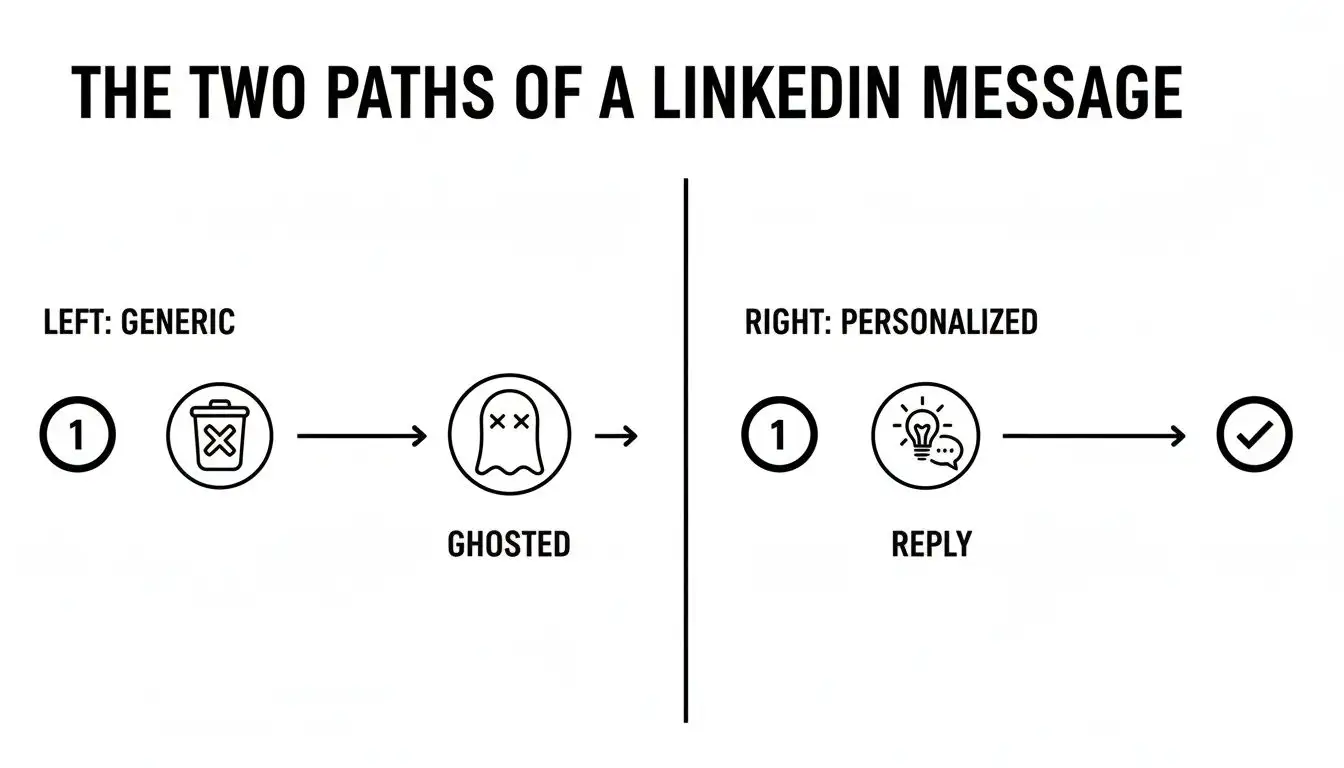
As you can see, personalization isn't just a "nice-to-have" feature. It’s the entire game. It's the one thing that separates a genuine connection from digital junk mail.
The Opening Hook
Your first sentence is everything. It has to grab their attention immediately without being weird or desperate. This is your digital first impression, your opening line at a networking event. "Hey there" is a non-starter, but so is a long-winded monologue about your company's origin story.
A great hook is timely and specific. It instantly shows them you're a real person who has paid attention.
-
Weak Hook: "Hi, I came across your profile and wanted to connect." (Translation: "You are one of 100 people I'm spamming today.")
-
Strong Hook: "Just saw your post on the future of AI in logistics. That point about last-mile delivery was spot on." (Translation: "I see you, I hear you, and I'm not a bot.")
The Personalization Signal
Okay, you’ve got their attention. Now it's time to prove you did your homework. The personalization signal is that one specific detail showing this message was crafted just for them. This is the secret sauce that makes your outreach feel like a thoughtful introduction, not a sales blast.
It could be anything from a shared connection to a recent company milestone or even a comment on an article they just published. You’re not trying to be a creepy internet stalker; you’re just being observant. It’s the difference between a generic compliment like, "Hey, nice shirt," and a genuine one like, "Hey, that's a cool Radiohead shirt, In Rainbows is a masterpiece." One is forgettable, the other starts a conversation.
The goal is to make your prospect feel like they were the only person you reached out to that day. When you nail that feeling, replies just happen.
The Micro Value Proposition
Easy, tiger. We're not selling anything yet. The micro value prop is a tiny, subtle hint about why this connection makes sense. It’s a low-key suggestion of relevance that sparks their curiosity without tripping their "I'm being sold to" alarm bells.
Your value prop should never be a feature list. Instead, it should be the logical bridge that connects your personalization signal to your reason for reaching out.
- For example: "Since you're scaling your sales team after that big Series B round, I thought our approach to SDR training might be interesting."
See how that works? It connects the dots for them. If you need more help finding these kinds of high-intent signals, our guide on prospecting on LinkedIn breaks down exactly where to look.
The Low-Friction Call-to-Action
Finally, you need to make it absurdly easy for them to say yes. The best calls-to-action (CTAs) in a connection request aren't demanding at all. You are not asking for a 30-minute demo. You are simply asking to connect. That's it.
Your CTA should feel like the natural, no-pressure conclusion to the mini-conversation you’ve just started.
-
Bad CTA: "Are you free for a call next week?" (Too much, too soon.)
-
Good CTA: "Would be great to connect and follow your work." (Simple and genuine.)
-
Another Good CTA: "Would love to connect and share insights." (Low-key and value-oriented.)
Matching Your Message to the Moment
Look, sending the same copy-paste LinkedIn connection request to everyone is a one-way ticket to the ignore bin. It’s the sales equivalent of bringing a Nickelback mixtape to a party. Sure, you might get a pity nod, but you’re not making any real friends.
To actually get replies, your message has to land at the right time with the right angle. It’s all about connecting your outreach to a specific, timely event in your prospect’s world. This isn’t about being a mind reader; it's about paying attention to the signals they’re already putting out there. When you do this, you stop being just another sales rep and start being a peer who's done their homework.
Let's break down how to nail this for the most common B2B scenarios.
The "Congrats on the New Gig" Message
When someone lands a new job, especially a leadership role, their first 90 days are a mad dash to make an impact. They’re actively hunting for new tools, fresh ideas, and partners who can help them score some quick wins.
This is your opening. Your message should give them a high-five for the new role and then gently slide in how you can help them look like a rockstar from day one.
Real-World Scenario: You sell a slick project management tool, and you spot that a new VP of Operations just joined a rapidly growing tech company.
-
Hook: "Congrats on the new VP of Ops role at Stark Industries, Tony!"
-
Personalization: "Jumping into a team that's scaling like crazy has to be an exciting, chaotic ride."
-
Value Prop: "New leaders in your spot are usually trying to wrangle workflows. We help teams do that without adding a million more meetings to the calendar."
-
CTA: "Would love to connect and follow your journey."
This works because it’s all about their current world. You’re not just pitching software; you’re offering a life raft for a problem they're almost certainly paddling through right now.
The "I See You Got Paid" Funding Message
A company that just announced a fresh round of funding might as well have a giant neon sign that says, “WE HAVE MONEY TO SPEND.” This is one of the juiciest buying signals you’ll ever find.
Your message needs to call out the funding news and tie it directly to the specific headache your product cures. A Series B round, for example, almost always means they’re about to go on a hiring spree. Your job is to simply connect the dots for them.
Pro Tip: Funding news isn't just about cash in the bank. It's a treasure map showing their exact priorities for the next 12-18 months. Your message should prove you can read the map.
Real-World Scenario: You sell an applicant tracking system (ATS), and a software company just locked down a $20 million Series B.
-
Hook: "Saw the huge news about your Series B. Major congrats to the whole team at Cyberdyne Systems!"
-
Personalization: "That kind of fuel in the tank usually means hiring is about to go into hyperdrive."
-
Value Prop: "As that talent pipeline explodes, things can get messy fast. We help teams automate the chaos so you can focus on finding the right people."
-
CTA: "Would be great to connect."

Spotting these professional milestones lets you craft a perfectly timed message that feels less like a cold pitch and more like a helpful heads-up. For more on this, check out this guide on how to find connections on LinkedIn.
The "I See You're Using Their Stuff" Tech Stack Message
Finding out a prospect uses a competitor’s tool isn't a dead end. It’s actually a huge opportunity. Why? Because you already know they have a budget and understand the value of a solution like yours.
Your goal here isn't a hard-nosed takedown. It's about planting a small seed of curiosity. You want to start a conversation, not a fight.
Real-World Scenario: You sell an email marketing platform, and you see a company is using a competitor who just jacked up their prices.
-
Hook: "Hey Sarah, noticed you're using MailChimp for the newsletters at InGen."
-
Personalization: "Just curious, how's the team finding their new pricing structure?"
-
Value Prop: "We've been hearing from a lot of teams looking for a more predictable alternative that doesn't punish them for growing their audience."
-
CTA: "Open to connecting and sharing what we're seeing."
This message is brilliant because it’s not aggressive. You aren't shouting, "We're better!" You're asking a smart, timely question that gets them thinking about their current pain points, opening the door for a much warmer conversation later.
The Art of the Follow-Up (Without Being a Pest)
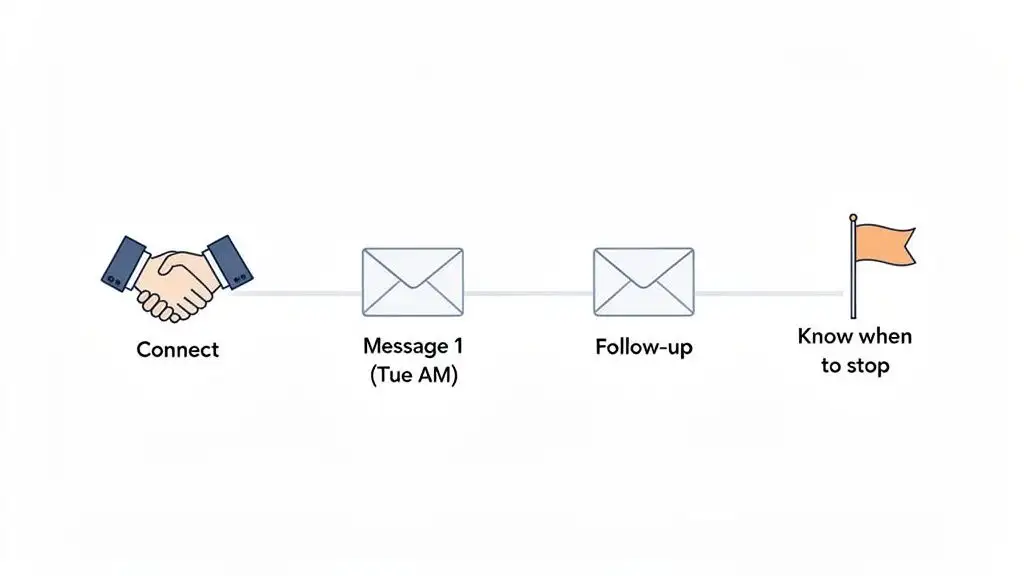
So, they accepted your request. Pop the confetti, right?
Not so fast. Getting the connection is only level one of the video game. The real boss battle is turning that connection into an actual conversation.
This is where most outreach, sadly, falls flat. You send a perfectly crafted LinkedIn connection message, they hit accept, and then… crickets. You're left wondering if they got lost in the digital ether or are just playing hard to get.
Don’t just sit there waiting. A thoughtful follow-up is a must, but there's a razor-thin line between being persistent and being a full-blown pest. Nailing this is an art form.
Timing Your First Move
The first message you send after they connect is arguably more important than the request itself. This is your shot to properly introduce yourself without that pesky 300-character limit cramping your style.
But when do you pounce?
Jumping on them the second they accept can feel a bit desperate, like showing up to a party three hours early. Give it some breathing room. I like to wait at least a few hours, or even until the next business day. This feels less like a robotic sequence and more like a real human reaching out.
Your follow-up should always add value, not just ask for something. Think of it as the next logical step in a conversation you’ve already started, not a brand-new sales pitch from a stranger.
Believe it or not, timing during the week makes a real difference. Tuesdays see the highest reply rates at 6.90%, with Mondays close behind at 6.85%. A smart follow-up can amplify this; a second message can boost replies by an extra 4.05%. If you want to nerd out on the numbers, check out the latest research on LinkedIn outreach trends.
Keep Your Follow-Up Cadence Short and Sweet
Forget those endless, 17-step email chains that make prospects want to fake their own disappearance. On LinkedIn, less is definitely more. A concise, two-step follow-up is all you need. Anything more is the sales equivalent of a TV show that should have been cancelled three seasons ago.
Here's a simple, effective structure that works:
-
Follow-Up 1 (1-2 days after connecting): This is your main "thank you" and value-add message. Reiterate why you connected, but this time, offer something useful. No hard pitch. Maybe it’s a link to a relevant article, a case study, or a helpful tip related to the pain point you mentioned in your request.
-
Follow-Up 2 (3-4 days later): This is the gentle nudge. Keep it short and sweet. A simple, "Hey, just wanted to make sure you saw my last message. Any thoughts on that article?" is often enough to get a response from someone who was just busy.
This approach respects their time while giving you two solid chances to start a conversation. Mastering this rhythm is a key part of building effective outreach, and you can dive deeper into this in our guide to sales cadence best practices.
If you get radio silence after the second attempt, it’s time to gracefully bow out and move on. No one likes a stage-five clinger.
How to Test and Improve Your Messages
So, you’ve got your templates and a follow-up cadence. Fantastic. But just blasting messages out without testing is like being a DJ who never looks at the dance floor. You're just dropping what you think are bangers, with zero clue if anyone is actually moving.
It's time to stop guessing and start measuring.
A LinkedIn connection message that absolutely crushes it with VPs of Engineering might completely bomb with Chief Marketing Officers. To figure out what actually gets a response, you have to A/B test your outreach.
Setting Up Your A/B Tests
Think of this like a science experiment, but with fewer lab coats and more closed deals. The golden rule here is simple: change only one thing at a time. Seriously. If you tweak the hook, the value prop, and the CTA all at once, you’ll have no idea what actually moved the needle. It's the sales equivalent of trying to debug code after changing ten different functions.
Here are a few dead-simple tests to get you started:
-
Opener vs. Opener: Pit a question-based hook against a statement-based one. For instance, test "Curious how you're handling X?" against "Saw your recent post about Y..."
-
Value Prop vs. Value Prop: Test a pain-point-focused value prop against one that's all about the benefits. See if "Tired of manual data entry?" outpulls "Imagine automating your weekly reports."
-
CTA vs. CTA: Try a direct, no-nonsense CTA like "Open to connecting?" versus a softer approach like "Would love to follow your work."
A/B testing isn't about finding one magical, "perfect" message. It’s about building a repeatable system that constantly bumps up your results, one small, data-backed tweak at a time.
Tracking the Right Metrics
To know if your experiments are working, you need to keep your eyes on two key numbers for each message version:
-
Connection Rate: What percentage of people actually hit "Accept"?
-
Reply Rate: Of those new connections, what percentage replies to your first follow-up?
Just throw together a simple spreadsheet to track these for Version A and Version B. Once you've sent 50-100 requests for each, a clear winner should emerge. The winning version then becomes your new "control" message, and you start a brand-new test against it. This cycle of continuous improvement is the secret sauce for anyone figuring out how to create workflows that actually deliver.
And trust me, this process is worth its weight in gold. The payoff is huge. A little personalization can boost your response rates by as much as 300% for both InMail and direct messages. Once you're connected, those direct messages pull in reply rates of 25-35%, absolutely demolishing the averages you see with cold email. If you want to dive deeper, these powerful LinkedIn messaging stats make it pretty clear why testing is non-negotiable.
Got Questions? We've Got Answers.
Still have a few things bouncing around in your head? No problem. Let's tackle some of the most common questions people have when they're trying to nail their LinkedIn outreach.
What's the Ideal Length for a Connection Message?
Think short, punchy, and easy to scan. You're working with a 300-character limit here, which is basically the length of an old-school tweet. Keep it to two or three tight sentences that cut right to the chase.
Your mission is to pique their interest, not send them a wall of text.
A killer formula looks something like this:
-
A personalized hook that shows you're not a robot.
-
A quick mention of why you're reaching out (the value for them).
-
A super simple, no-pressure question or next step.
Remember, most people are scrolling through these requests on their phones while waiting in line for coffee. Anything that looks like work gets ignored immediately.
The sweet spot is a message that’s long enough to prove you’ve done your homework, but short enough to be read in less than ten seconds. Brevity is your secret weapon.
They Accepted My Request... but Ghosted. Now What?
Definitely follow up! An accepted request is a green light, not the finish line. Think of it this way: someone just opened the door for you at a party. You wouldn't just stand there in the corner and say nothing, right?
Give it a day or two, then send a friendly follow-up. The key is to add value, not just re-state your original pitch. A simple, "Great to connect, [Name]. I saw this article on [Relevant Topic] and thought you might find it interesting," can work wonders.
There’s no sales pitch, just a helpful gesture. It shifts the dynamic from "I want something" to "I want to build a real relationship."
How Do I Personalize Messages Without Spending All Day On LinkedIn?
This is where you bring in the right tools. Think of it as having a co-pilot who does all the boring work for you. Manually digging through every single profile for 20 minutes is a recipe for burnout.
A sales intelligence platform can do the heavy lifting for you. For example, a tool like Munch automatically pulls out the most important buying signals, things like recent job changes, a new funding round, or a major product launch.
This lets you drop a powerful, timely reference into your opening line without breaking a sweat. It's the perfect combo of smart tech and a human touch, giving you the best of both worlds.
Ready to stop guessing and start connecting with prospects who actually want to talk? Munch finds high-intent buyers and crafts AI-personalized messages that get replies, so you can spend less time prospecting and more time selling. See how Munch can transform your outreach.